

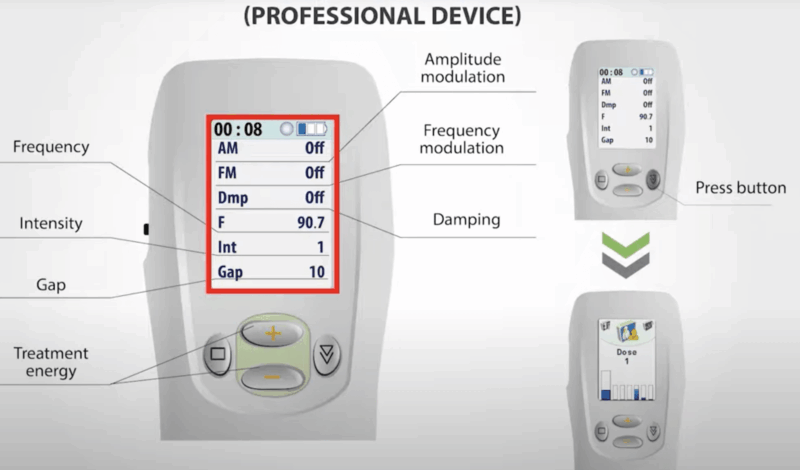
1# Switching on and setting the parameters. SCENAR-1-NT.
2# Dose 1 and Dose 2 modes and their differences. SCENAR-1-NT.
3# Digital screening (Dose 3) and Acupuncture expertise (Dose 5). SCENAR-1-NT.
4# Dynamic screening – the newest expert mode (worldwide patented). SCENAR-1-NT.
5# Treatment energy adjustment according to sensations. SCENAR-1-NT.
6# Treatment energy and the receptive body structures. SCENAR-1-NT.
7# Amplitude modulation (AM): Signal/Pause. SCENAR-1-NT.
8# Frequency Modulation (the universal mode). SCENAR-1-NT.
9# SWING – activation therapy. SCENAR-1-NT.
10# Which tissues the frequency influences. SCENAR-1-NT.
11# How to make painful influence non-painful. SCENAR-1-NT.
12# Comfort way to increase the treatment energy and depth. SCENAR-1-NT.
13# Controlling the signal penetration depth. SCENAR-1-NT.

1 Comment. Leave new
Hope things are OK, I am not receiving any reply from you June 22th I am worried you are not receiving my emails. Please give me the status of my order with the tracking number.